Every screen under control
Lid behavior
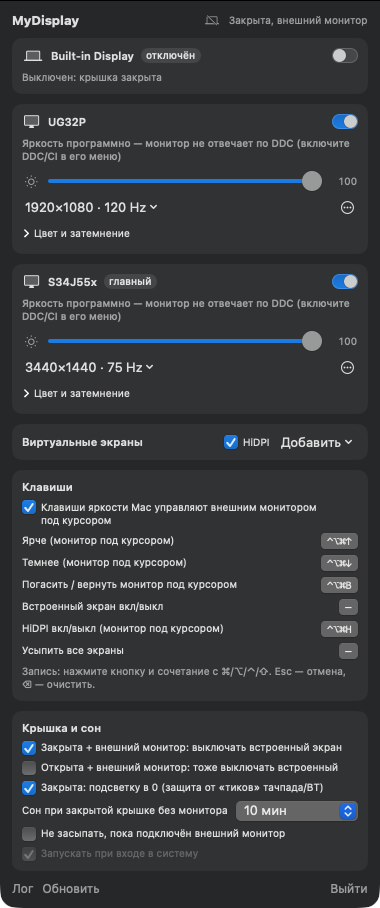
Closed with an external monitor, the built-in screen turns off; closed without a monitor, the screen goes dark and won't wake from trackpad or Bluetooth mouse touches, the Mac sleeps on a timer.
HiDPI and resolution
Crisp Retina mode on 2K/4K/ultrawide monitors via a virtual screen, all hidden resolutions and refresh rates.
Brightness and color
Brightness, contrast, volume via DDC; software dimming to black where DDC is absent. Temperature, gamma, contrast, RGB channels for each monitor.
Virtual screens
1080p–4K, HiDPI, for headless Macs, screen sharing, and creating extra workspace.
Full control
Protected layout and presets, rotation and HDR, picture in picture, LG and Samsung TVs, disconnect without pulling the cable. Shortcuts for everything, the mydisplay tool.
It all started with a broken sensor
We were fixing a MacBook with a dead lid sensor. macOS no longer understood when it was closed: the screen stayed on in the backpack and woke up from any trackpad touch.
MyDisplay reads the hinge angle sensor directly. When the lid closes, it reproduces exactly what macOS should do, and never again allows a closed lid to turn on the screen.
- Lid and sleep What to do when the MacBook is closed: turn off the built-in screen, sleep the Mac on a timer.
- Monitors Resolution and HiDPI, brightness, color, disconnection without cable.
- Hotkeys Hotkeys and Mac brightness keys for external monitors.
Installation
- Download and open the DMG file.
- Drag MyDisplay to the Applications folder. On first launch, macOS will block the app. Go to System Settings → Privacy & Security, scroll down and click "Open Anyway".
- Launch the app and grant access to Accessibility (to control brightness with the keyboard).
Frequently asked questions
Which Macs are supported?
Macs with Apple Silicon (M1 and newer), macOS 14 Sonoma and newer.
Does the app send my data?
Nothing, unless you add a TV: then MyDisplay talks only to that TV, on your local network. No automatic updates, no statistics.
Why is DDC brightness unavailable on my monitor?
Enable DDC/CI in your monitor's menu. Some adapters and docks block DDC — software dimming works instead.
What language is the interface in?
French, Dutch, German, English, Russian and Spanish — following your Mac’s language, or chosen in the app’s settings.